Skip to content
Accounting
Audit
Planning & Analysis
Process Solutions
Operations



This blog explains how integrated accounting systems are improving businesses
Different platforms have different uses, and choosing the wrong one costs money and time.
Is your business running on several software platforms that refuse to talk to each other? Are you manually copying numbers from one spreadsheet into another at 11 PM, wondering why the totals never match? We have very good news for you. The integrated accounting system is here.
Every year, we sit across from business owners who have outgrown a spreadsheet, been oversold on enterprise software, or inherited a system that was the right choice but for someone else’s business. Instead of searching for the best system, teams should select a system that is the best for their company and use-case.
After advising clients across dozens of industries, we have developed strong views on this. Here is our plain-English breakdown of the major integrated accounting platforms, when they shine, and when they fall short.
An integrated accounting system is a software platform that consolidates all of your company’s financial functions into one single application. We are talking about accounts payable, accounts receivable, payroll, the general ledger, financial reporting, and inventory management, all of it, living together in one place, updating each other in real time.
The keyword here is real-time. In older systems, and many businesses are still running these, data lives in silos. Your sales team records a transaction in their CRM. Your accountant records the same transaction in a separate accounting tool. Your warehouse records the inventory change in a third system. By the time all three are reconciled, days have passed, and the numbers still do not agree. Sound familiar?
The fact is that chaos has a price tag. According to IDC Market Research , incorrect or siloed data can cost a company up to 30% of its annual revenue in operational inefficiencies alone. An integrated accounting system eliminates that problem by giving every department a single source of financial truth. One system. One update. Everyone is on the same page.
But integration comes in degrees. Some platforms integrate across financials only. Others extend into inventory, CRM, project management, and HR . It is half a battle to understand which integrations are important to your business model.
This is where the majority of advisors stand at a feature comparison. However, the right system is based on size and also on your business model, growth path and complexity of operations.
| Your Situation | Best Fit | Why |
| Professional services company, 5-50 workers, hourly billing. | Xero | Easily integrates with time-tracking apps such as Harvest and WorkflowMax. Fast bank rec. Minimal overhead costs to keep. |
| Retail and e-commerce with inventory management | QuickBooks Online | Native inventory tracking, robust Shopify and WooCommerce integrations, and robust COGS reporting. |
| Charity and NGOs that report their grants. | Sage Intacct | Multi-dimensional GL coding enables work-around-free grant, program and funder reporting. Purpose-built for this. |
| Multi-entity business or holding structure. | Sage Intacct or NetSuite | They both support inter-company eliminations, consolidated reporting and entity-level P&Ls. NetSuite is victorious at greater complexity. |
| Growing startup that is on its way to series funding. | NetSuite | The areas that investor-grade audit trails, revenue recognition (ASC 606/IFRS 15) and scalability investors anticipate will be found in due diligence. |
| Business manufacturing or distributing. | Dynamics 365 or NetSuite | Both have first-class features such as bill of materials, production scheduling, landed costs, and warehouse management. |
| Business based on construction or projects. | QuickBooks Online or MYOB Advanced | Both provide project/job costing and progress billing. QBO enjoys broader industry add-on. |
| Health care or licensed professional practice. | Xero with specialist add-ons | Strong API that is compliance friendly to practice management software integration. Less complex audit footprint compared to full ERP. |
| SME in Australia or New Zealand outgrowing basic software | MYOB Advanced | Local BAS, STP Phase 2, and Superannuation compliance is not an appendix, but a core part. |
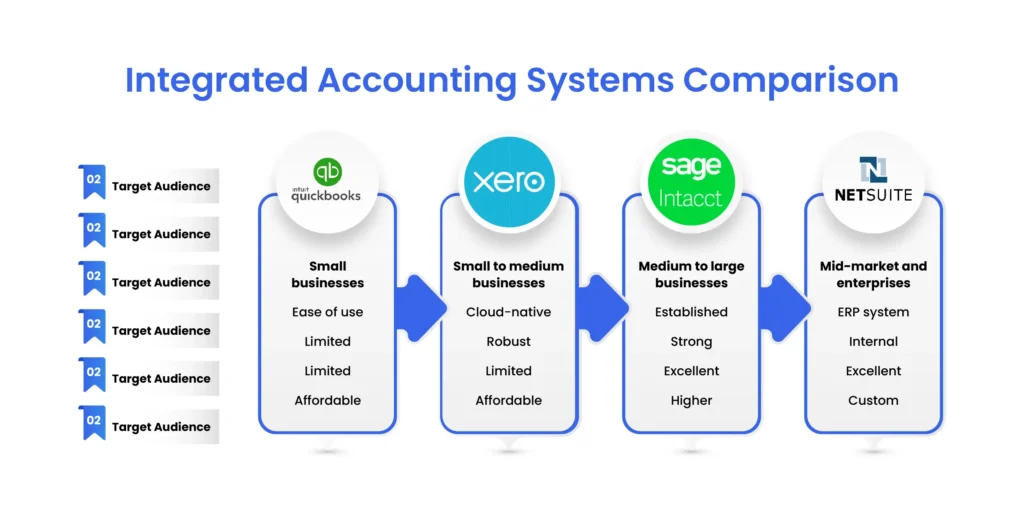
There are dozens of integrated accounting platforms available in the market, but only four of them are commonly used by most businesses: QuickBooks, Xero, Sage Intacct, and NetSuite. Each is used in a different phase of business.
QuickBooks Online is probably your initial home, and it may take you much further than you suppose if you are a small to medium-sized business. Accountants and bookkeepers in the United States are fully justified in their trust, payroll, taxes, invoicing, and reporting are intuitive enough to navigate even by a business owner with no accounting background whatsoever. QuickBooks currently serves more than 7 million businesses, and that number says something.
Real users agree. An authenticated G2 reviewer summed up the payroll experience simply: it is easy to set up, auto-pay, auto-calculate tax, and file paperwork where necessary.
The realistic development path looks like this: Excel is good until about $100K of revenue for a company, QuickBooks to about $50M, and then something more substantial is needed to scale to enterprise level. No other small business accounting software can provide you with a longer runway before you have to upgrade. The catch? When you do have to upgrade, the migration is painful. Plan ahead.
Best when: You are a startup, freelancer, small business, a company based in the US, or are otherwise brand new to integrated financial software.
Xero was developed from the ground up as a cloud-based product, and it makes a real difference. Just as QuickBooks and Sage were originally desktop applications later converted to the cloud, Xero was built on the cloud from day one. The outcome is a more polished interface, a superior mobile experience, and one of the most robust integration ecosystems in the market, with over 1,000 third-party applications available in the Xero App Store. It also allows unlimited users across all plans, which is a significant cost advantage for growing teams compared to per-seat models.
Xero was founded in New Zealand in 2006 and has since grown to over 4.2 million subscribers across more than 180 countries. That is not a small operation.
If your team is remote, you must collaborate with multiple users, per-seat pricing is no longer feasible, or you are located in Australia or New Zealand, Xero is certainly worth a serious look.
One G2 user was open about the eventual need to migrate: when you grow big enough, you will have to switch to something like NetSuite, Dynamics, or Sage Intacct. Fair enough. Xero is not designed to be an enterprise system. But for the right business, it is very difficult to beat.
Best for: Small and medium-sized businesses, freelancers, teams who require robust third-party integrations, international businesses, and cloud-first operations.
The Sage Group has been around in accounting software since 1981, when it was founded in Newcastle upon Tyne to develop accounting software for small businesses. But it is Sage Intacct specifically, founded in 1999 as Intacct and acquired by Sage for $850 million in 2017, that has become the enterprise powerhouse we are discussing here. Decades of solving complicated accounting problems have a tendency to produce a serious product. Sage Intacct is rated the #1 finance software on G2 for customer satisfaction and is trusted by over 30,000 finance teams worldwide.
Sage Intacct is geared towards companies that have outgrown basic bookkeeping and need true enterprise-level financial management. Multi-entity support, strong compliance solutions in regulated industries, powerful inventory management, project accounting, and manufacturing flexibility, the multi-entity architecture specifically manages complex organizational structures without the workarounds. According to Sage Intacct, their customers typically see close times reduced by up to 90% and a 5x ROI within six months.
The learning curve is the real tradeoff. Sage Intacct needs additional financial expertise to work. It is not something you hand to a founder who only wants to know whether payments are coming in. But for established businesses with dedicated accounting personnel, it is a genuinely powerful tool.
Best for: Medium to large businesses, manufacturing and distribution firms, regulated industries, businesses with complicated inventory or multi-entity requirements.
Before we get to the enterprise endgame, it is worth mentioning Odoo , which sits between QuickBooks and NetSuite and is particularly relevant for ecommerce businesses. Odoo is a fully open-source ERP that covers accounting, inventory, ecommerce, CRM, and more in a modular, customizable setup. It is a strong option for businesses that have outgrown QuickBooks but are not quite ready for NetSuite-level investment. The modular pricing means you only pay for what you use, making it more affordable at mid-scale.
Best for: Mid-market ecommerce businesses, businesses wanting a customizable ERP without the NetSuite price tag.
NetSuite is not a simple accounting software . It is a full-fledged ERP (Enterprise Resource Planning) system with CRM, e-commerce, financial management, and much more built natively into the platform. When businesses have multinational operations, multiple subsidiaries, or extensive customization needs in financial operations, NetSuite is the natural home.
Where QuickBooks and Xero rely heavily on third-party integrations, NetSuite builds CRM, ERP, and e-commerce internally.
Oracle acquired NetSuite in 2016, giving it the infrastructure of a tech giant behind it. Pricing is custom-quoted and starts at approximately $999 per month for the base license, with user fees, modules, and implementation costs added on top. Most businesses pay anywhere from $25,000 to $250,000+ annually once everything is factored in.
Honest criticism? Posting bank records is not as seamless as QuickBooks and involves extra manual procedures. This is something users feel early on. The onboarding is also intensive. But the companies that go through the process rarely regret it.
Best for: Mid-market and enterprise businesses, international companies that require a full ERP, businesses with revenue above $50M.
Subscription pricing is only the beginning. When we model the total cost of ownership for clients, we consistently find that implementation, customization, and training are where budgets blow out.
| Category | Winner | Why |
| Lowest TCO (3-year) (1) | Xero / QuickBooks Online | Predictable SaaS pricing, large advisor pool, minimal configuration for standard use cases. |
| Highest implementation risk | NetSuite / Dynamics 365 | Complex, highly configurable systems. Under-resourced implementations are common and costly. |
| Best reporting ROI | Sage Intacct | Dimensional reporting capability eliminates most custom workarounds. Pays for itself in finance team time. |
| Easiest migration path | Xero | Conversion tools, a large advisor community, and a clean data import process make migrations predictable. |
The general consensus on QuickBooks is that it is truly popular and useful to small business owners, but power users reach the wall quickly, particularly in terms of inventory and multiple users. The phrase that comes up over and over again from users is that it’s great until you grow.
Xero users tend to be enthusiastic. The slick interface and rich integration ecosystem is continually praised, and the unlimited-users model is a highly tangible positive to lean teams. The general observation is that certain functions like expense claims, project tracking are concealed under higher levels of subscription, which silently raise monthly charges.
Sage Intacct users point out scalability and long-term customizability. One reviewer of G2 said it was simple: the platform is accruing value as the company grows. The common challenge is the complexity in setting up, but the companies that passed the learning curve are quite content.
NetSuite feedback at the enterprise level is mainly positive, with the main areas of concern being price and onboarding. There is no team that just migrates to NetSuite at random but the companies that do it hardly regret their choice.
Before dedicating any platform, make sure that you take these five questions seriously:
If you want to discuss your needs versus the right software with our experts. Expertise Accelerated provides a one hour consultation call for free. We can review your needs and help you make the right choice.
The firms that have the best financial visibility experience faster decision-making, using superior data. Integrated accounting platforms make this possible. Choosing the right system for your business matters and teams should take some time to evaluate their options beforehand.
Overall, the right system gets your finances straight, and liberates you to operate your business.