Skip to content
Accounting
Audit
Planning & Analysis
Process Solutions
Operations



Your e-commerce numbers don’t match; here’s the system that finally fixes everything.
A practical guide for CPG brands, online sellers, and growing product businesses
The Books That Never Balance
Picture this. It is 11 PM on Sunday. Your Shopify store had a fantastic weekend. The Amazon dashboard indicates good figures. However, when you open up QuickBooks, they are not the same. You know money came in. You have no clear idea of its amount, source, or price. Sound familiar?
The majority of accounting software was designed in a world where goods flowed through a single register, a single ledger, and a single door. E-commerce accounting does not do so; it requires leading automated accounting tools with full e-commerce integrations to be a successful enterprise.
You can sell the same item on Shopify, Amazon, and your site all within the same hour. All platforms have varying charges, payouts are issued on varying schedules, and numbers are reported in various formats. Combine various warehouses, returns, and changing cost of goods sold (COGS), and you will have a financial puzzle.
This guide discusses the top automated accounting tools with complete e-commerce integrations. We will discuss how QuickBooks helps, the best inventory tools to use with it, what makes Odoo a good choice for inventory management (especially when you don’t want to implement an ERP system), and when a growing business should consider switching to an ERP system.
Recent industry data indicate that by 2025, e-commerce sales will have reached 21% of the overall global retail sales of about 6.86 trillion. And multi-channel selling has increased by 143. It is exciting to have that growth. But it has caused a financial mess for many product businesses ( CantFlow Global ).
The very essence of the issues is not complex, yet it spreads quickly:
There is an extra layer of tax compliance. States’ and countries’ sales tax regulations vary. All platforms differ in how they calculate tax. By doing all this manually at the end of the month, you are wasting hours and putting yourself at risk of making mistakes that can lead to audits.
| E-commerce Industry FAQ:
Why is my accounting data not the same as my marketplace reports? Answer: Payouts are net amounts (including adjustments and deduction of fees), not gross sales. The deposit is posted, rather than the breakdown, by standard accounting software. This fix either needs a middleware solution, such as A2X or Webgility, or an accounting solution that uses raw order data as input rather than bank feeds. |
QuickBooks controls more than half of the U.S. market in accounting software among small and medium enterprises. Most of the CPG brands, DTC sellers, and retail businesses have their default starting point. And with reason. It does invoicing, payroll, bank reconciliation, tracking expenses, and simple reporting well.
It’s user-friendly.
Accountants know it.
Bookkeepers know it.
The majority of ProAdvisors are qualified in it.
However, QuickBooks was not developed to support inventory-intensive and multi-channel selling. Its inbuilt inventory tool is alright when a business has only one location and has a manageable number of SKUs. When you introduce a second warehouse, sell on two sites, or need to trace batch lots or serial numbers, the inventory capabilities native to QuickBooks begin to fail.
What QuickBooks Cannot Do Out of the Box:
Fortunately, dozens of specialized tools fill these gaps and are integrated with QuickBooks. You don’t have to leave QuickBooks to fix these problems. All you require is the right partner software next to it.
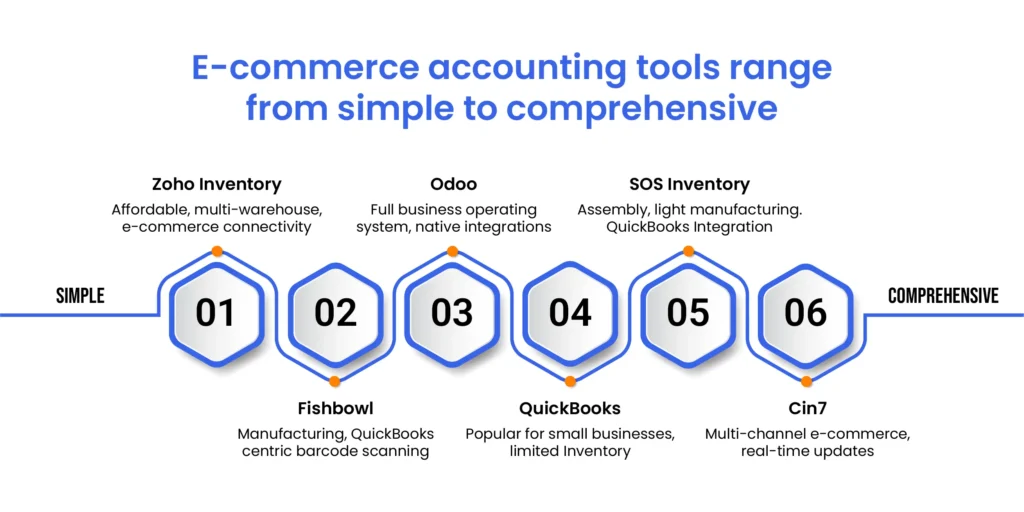
Inventory tools are not created equally, and it costs time and money to reverse the decision to choose the wrong tool. The following are the best choices, and here is how each of the choices performs best.
The Fishbowl has gained a reputation as the preferred inventory system among QuickBooks users with complex manufacturing or warehouse requirements. It integrates with QuickBooks Online and QuickBooks Desktop, and its Desktop integration is generally regarded as the best on the market. It has been mentioned in Forbes and Newsweek as one of the top inventory choices in QuickBooks.
What Fishbowl does best:
It manages work orders, bill of materials, lot and serial number tracking, multi-warehouse operations, and barcode scanning. It has direct integrations with Amazon, Shopify, Walmart, and BigCommerce to retrieve orders and stock changes. It also has built-in Shippo shipping label printing, eliminating the need for a third-party application.
Best application:
A mid-size manufacturer or distributor with QuickBooks desktop requires intensive production monitoring and inventory. Consider food and beverage, health products, automotive parts, or any business manufacturing or assembling finished products out of raw materials.
Where it lacks:
Fishbowl is a depth-oriented rather than speed-oriented construction. Its syncs are not usually real-time but scheduled, and as such, there may be a slight delay in stock being updated across e-commerce channels. Its interface may be dated, and installation can be complex and may need a consultant or value-added reseller (VAR). Cost begins at approximately $329/month based on manufacturing plans, and the implementation fee may be up to $4,000 or more.
Cin7 (and its variant Cin7 Core, previously called DEAR Inventory) is a cloud-native platform that is designed to accommodate current, high-paced product companies. It is connected to more than 700 e-commerce, accounting, shipping, CRM, and EDI platforms. Its Shopify and Amazon links are live, i.e., stock updates are made within seconds, rather than batch-based.
What Cin7 does best:
The strongest option is to offer sellers operating in various marketplaces at the same time. Shopify, Amazon, WooCommerce, eBay, and BigCommerce orders are redirected to a single dashboard. Stock changes are automatically pushed back to all channels. It makes it easy to integrate with QuickBooks Online and Xero to do accounting, ShipStation to do fulfillment, and HubSpot to do CRM. It has the best reporting and dashboard in the industry.
Best application:
A rapidly expanding DTC or wholesale brand that is distributed through three or more channels requires a single source of inventory knowledge. Fashion, health and beauty, food and beverage, and high SKU and fast inventory turnover.
Where it lacks:
Cin7 has a starting price of $349/month and is pricier when you increase the size of your team. Out of the box, customization is limited, and there are users who complain of a steep learning curve in the process of onboarding. Customer service has been both positive and negative.
Zoho Inventory has been ranking steadily at the top of QuickBooks online integrations due to its coverage of the largest area at the lowest cost. It processes multi-location tracking, item bundling, barcode, purchase orders, and shipping tools. It has a two-way sync with QuickBooks online, which is one of the cleanest integrations on the market – items, invoices, bills, payments, and inventory changes are all automatically synchronized.
Best use case:
Small-to-mid-size e-commerce companies that process shopping on either Shopify, Amazon, Etsy, or eBay and require their inventory, orders, and fulfillment requirements to be aligned without the expense or complexity of Fishbowl or Cin7. It does not have sophisticated BOM and manufacturing support, but for simple sellers of products, it is difficult to compete with it in terms of value.
SOS Inventory directly connects with QuickBooks online and introduces solid manufacturing and assembly features unavailable in QuickBooks. It records the stock in different warehouses, establishes reorder levels so as to avert stockouts, and generates work orders and bills of materials. It also provides integration with Shopify, BigCommerce, and PayPal.
Best use case:
An expanding brand of products that builds or kits completed products and requires production workflow visibility without the cost of Fishbowl or Cin7.
| Integration Scenario:
This is a real case where integration is appropriate: A CPG brand sells hot sauce on Shopify, Amazon, and in retail. They keep records using QuickBooks. COGS is, however, inaccurate in each month since QuickBooks does not record raw materials and batch production. The remedy: connect Fishbowl or Cin7 to do the production and multi-channel orders, and allow QuickBooks to receive the clean financial summary, COGS, inventory values, as well as the purchase orders automatically. No double entry. No spreadsheet reconciliation. |
What is the real difference between the Odoo inventory model and the QuickBooks model, and why do people claim that it has a solid inventory system?
It all boils down to architecture. QuickBooks is an accounting program that, over time, developed inventory features.
Odoo is a complete business management solution – what some refer to as an ERP (Enterprise Resource Planning) system –
where inventory, accounting, sales, purchasing, manufacturing, CRM, and e-commerce are all native modules sharing the same database.
When you make a sale in Odoo, the inventory is automatically updated, the COGS is automatically updated in the P&L, and a pick order is automatically sent to the warehouse, all in a single operation and without needing to sync.
“From my own personal experience, inventory management is a huge, probably the biggest, single reason to migrate fully to Odoo. It’s a lot easier to have all of your accounting accurate when your inventory is real time and up to date.” — B.J. Lawson, Dooable Health (via VentorTech )
Yes – and this is amongst the most frequent growth inflection of the mid-market. It is as follows:
An organization begins with QuickBooks. It works well. The team knows it. It is known by their accountant. But with the growth of the business, the cracks show:
This is the evoking point. The company is also too small to use QuickBooks by itself, but not big enough to warrant a more traditional ERP system such as SAP or NetSuite that requires costly implementation staff and a multi-year contract.
Odoo falls into this gray area. It is a full capability ERP, but is modularly organized. An accounting and inventory system is all that is needed to begin a business before the addition of CRM, e-commerce, manufacturing, or HR. The community version is open source. The enterprise version costs approximately 30 per user/month, which is competitive to the sum of QuickBooks and several third-party integrations.
However, not every company takes Odoo. Others remain in QuickBooks and add more specific applications. Others skip to NetSuite or Microsoft Dynamics when it is necessary because of their complexity. It can be determined by three factors, and these factors include: order volume, complexity of operations, and the number of systems the business is stitching together.
| The Rule of Thumb: When your organization uses more than three distinct software tools for its everyday operations and the tools do not communicate data cleanly, it is time to consider a single platform such as Odoo. When you are using QuickBooks and only need an inventory improvement, start with Fishbowl or Cin7. Only migrate to a new accounting system when the cost of patching QuickBooks outweighs the cost of starting fresh. |
Integration is not a solution by itself ; it is a tool that will resolve a certain group of issues. The knowledge of what integrations to effect, and when, can save a great deal of wasted vendor discussions.
This is the most prevalent situation. You sell on Shopify and Amazon. Both make payouts to your bank. Both dividend distributions are net of fees, share buybacks, and platform fees. QuickBooks logs the deposit but does not know the contents of the deposit. Outcome: your revenue is understated, your fees are uncategorized, and your COGS is impossible to calculate.
The fix: An intermediate software program, such as A2X or Webgility, takes raw order-level data for each site and translates it into QuickBooks appropriately – separating out the gross sales, platform fee, refunds, and taxes into individual line items. This transforms reconciliation into a nightmare that can only be resolved in a week into a one-click response.
You’re selling on three channels. Each sale should reduce your available stock. But your channels are pulling from different data sources and updating at different speeds. You oversell. You stockout. You carry too much buffer stock to compensate, tying up cash.
The fix: Integrate Cin7 or Fishbowl as your inventory system of record. Every channel pulls stock levels from the same place. Every order updates that number instantly. QuickBooks gets the accounting entries. Your warehouse gets the pick orders. One system, clean data everywhere.
You purchase raw materials. You make finished products. You sell them. Your real cost per unit is getting lost somewhere in there. QuickBooks can only follow the sale but not the cost of production. Your margin reports are fiction.
The solution: fishbowl or Cin7 handles bills of materials and work orders which automatically roll up the costs of raw materials and labor into finished goods. In QuickBooks, the real cost is not an estimated cost, but the actual cost that is transferred to the inventory and then to the COGS when you sell a unit.
If you are wondering about which software is best for your platform or how to migrate your data, Expertise Accelerated gives you a one hour free consultation where we will understand your business and answer your queries free of charge. Call now!
Leading automated accounting tools with full e-commerce integrations all come with their own limitations. Only the right tool is where your business is currently, and what issues it is actually addressing.
In the case of a small brand with limited experience, QuickBooks Online and a reconciliation tool such as A2X and an inventory manager to help with stock tracking, like Zoho Inventory, will go a long way without spending much or having much complexity.
Fishbowl is the most reliable partner for deep inventory and production management, particularly for mid-size manufacturers and distributors on QuickBooks Desktop. Cin7 provides the most extensive platform integration ecosystem and the quickest real-time connectivity across platforms in case you are a fast-paced, multi-channel e-commerce brand.
When you have completely outgrown QuickBooks, when you have four or five software tools patched together just to get to the end of the month, Odoo has an integrated inventory and accounting system that will eliminate the patchwork and put everything under a single roof. It is not a complex or expensive ERP system, but it can provide ERP-level inventory functionality at a fraction of the cost.
What unites all the major automated accounting solutions with complete e-commerce integrations is this: to be accurate at scale, systems must communicate with one another, without any human intervention. Any manual entry can be an error. Any platform that is not linked is an unbridgeable gap in your financial image. It is the businesses that do not view their accounting system as a stand-alone tool that will succeed at e-commerce finance and begin to view it as the heart of a linked stack of operations.